
Mini Dev-C++
A lightweight C IDE for macOS that recreates the Dev-C++ 4.9.9.2 experience — the same menu bar, project explorer and compile / run / console workflow, rebuilt with SwiftUI for macOS 14 and later.
Free & open source · 100% offline · needs the Xcode Command Line Tools for clang
The Dev-C++ look, pixel-honest
Menus, toolbar, project explorer, editor palette, compiler log — the layout an entire generation learned C in, running natively on macOS.
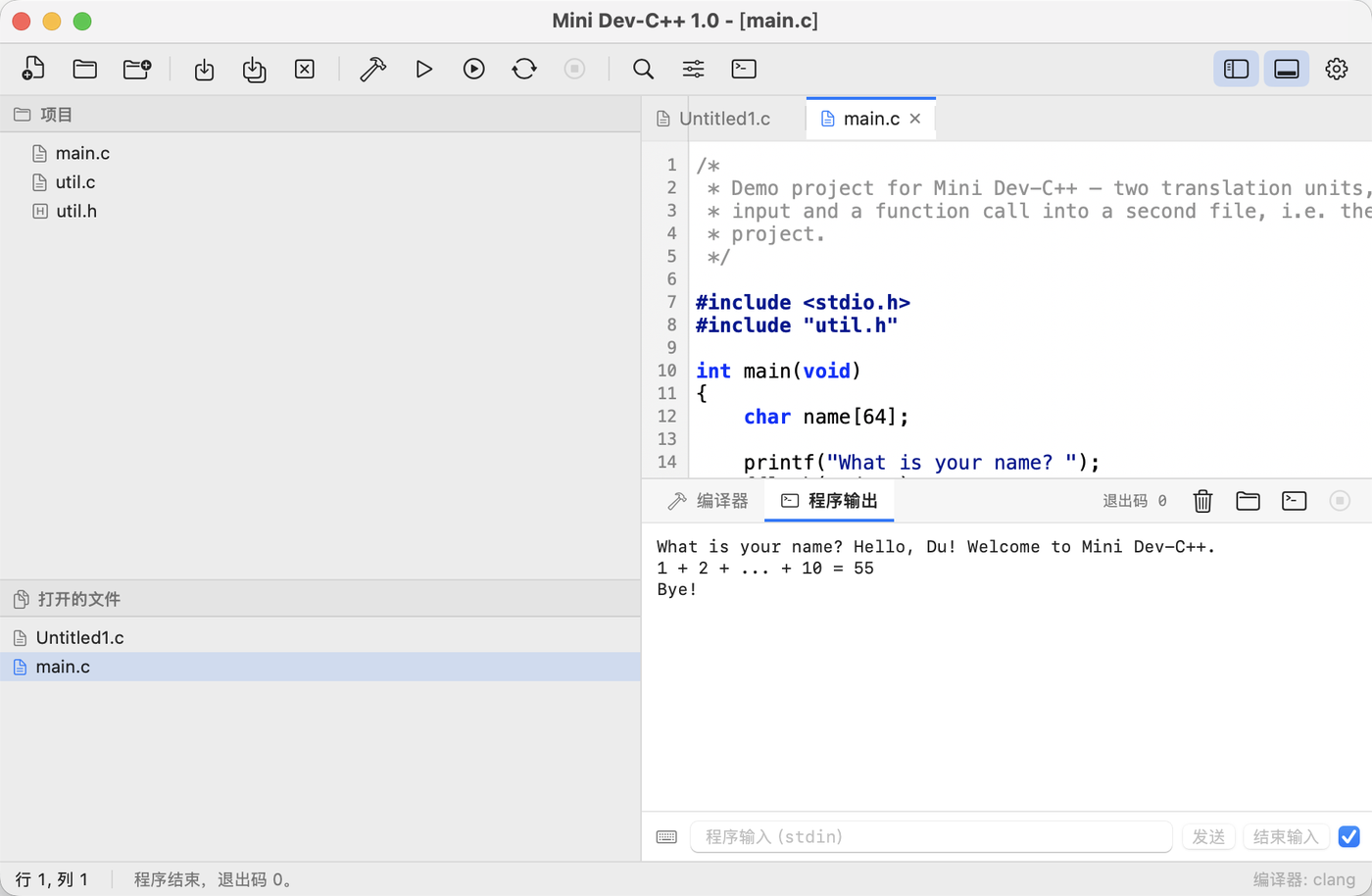
Everything an old-school C course needs, and nothing more
No plugins, no package manager, no accounts. Open a file, press ⌘B, see the errors, press ⌘R.
Two minutes from download to first compile
Drag the app into Applications, install Apple's command line tools once, and start writing C.
Get the app
Download Mini.Dev-C++.For.Mac.V1.0.dmg from GitHub Releases and drag Mini Dev-C++.app into /Applications.
Install the compiler
The IDE drives the clang that ships with the Xcode Command Line Tools — full Xcode is not required.
# one time only
xcode-select --install
Open a file or a folder
⌘N for a new file, ⌘O for a .c file, or File ▸ Open Folder as Project… to load a folder — every .c/.cpp/.m inside is compiled and linked into one executable.
Compile & run
⌘B compiles, ⌘R runs, ⌘⏎ does both. Diagnostics land in the Compiler tab — click one to jump to the line; program output and stdin live in the Program Output tab.
Build it yourself in three commands
A plain Swift Package plus build.sh — no Xcode project, no dependency manager, nothing to fetch.
# clone
git clone https://github.com/duhaoze2007/MiniDevCppForMac.git
cd MiniDevCppForMac

# build the app bundle (ad-hoc signed)
bash build.sh

# launch it
open "Mini Dev-C++.app"
@State, @Binding, …) are macros whose implementation ships only inside Xcode. build.sh detects a Command Line Tools–only toolchain and builds against the newest installed SDK whose SwiftUI declares no such macros; the binary still runs on the current macOS. With Xcode installed the workaround is skipped — export SDKROOT to override the choice yourself.The shortcuts muscle memory already has
Same chords as the original: compile, run, rebuild, find, comment, toggle the panes.
| Shortcut | Action |
|---|
Standing on other people's shoulders
Mini Dev-C++ is an independent re-implementation: it contains no code from Dev-C++ — the original is credited as the design reference only. The same list appears in-app under Help ▸ About Mini Dev-C++.